Collect by Direct Debit
Let a customer agree a Bacs Direct Debit once in their portal, then have each new invoice collected from their bank on its due date.
A customer on a round pays you every month. With a Direct Debit they agree to it once, and each invoice you send after that is collected from their bank without anyone pressing a button. The money goes into your own Stripe account. This page follows the web.
Collecting by Direct Debit is on the Pro and Business plans.
What you must do first
- Be on Pro or Business. See Plans and limits.
- Connect Stripe. See Take payment online.
- Switch on Bacs Direct Debit in your own Stripe dashboard, in its payment method settings. Stripe has to approve it, and may ask you for more proof of who you are first.
- Leave Stripe's emails to your customers switched on. Stripe writes to your customer when they set a Direct Debit up and before every collection, as the Bacs rules require. TradeSender does not send those notices.
- Give your customers their way in to the portal. They set the Direct Debit up there. See Give a customer their way in.
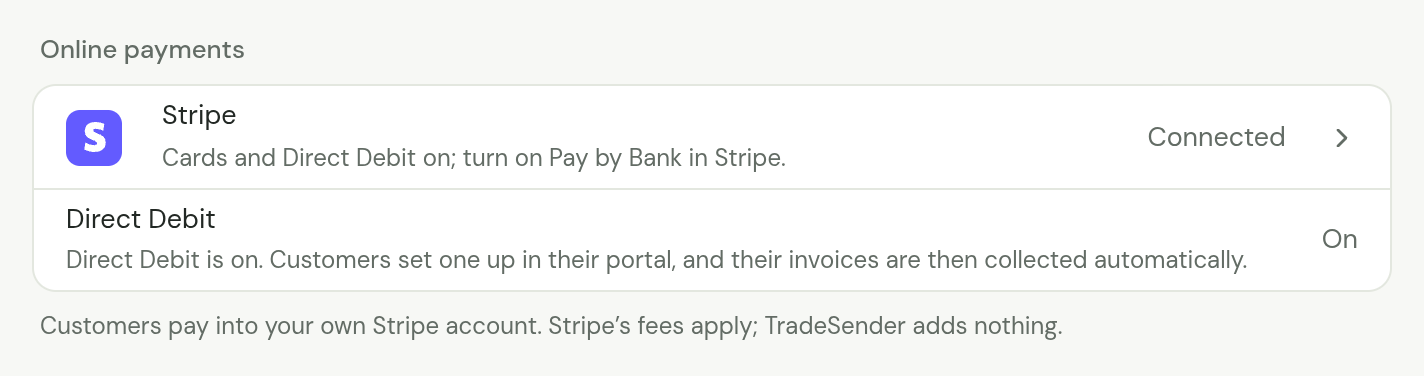
When all of that is done, Settings, Getting paid, Online payments shows a Direct Debit row that reads On.
| The Direct Debit row says | What to do |
|---|---|
| On, "Direct Debit is on. Customers set one up in their portal, and their invoices are then collected automatically." | Nothing. Your customers are offered a Direct Debit in their portal |
| Off, "To collect by Direct Debit, switch on Bacs Direct Debit in your Stripe account." | Step 3 |
| Off, "Automatic Direct Debit collection isn’t included on the Free plan." | Step 1 |
The row appears once a Stripe account is connected.
What your customer does
Only your customer can set a Direct Debit up, signed in to their own portal. Nobody on your team can do it for them, and there is no link you can send that does it.
-
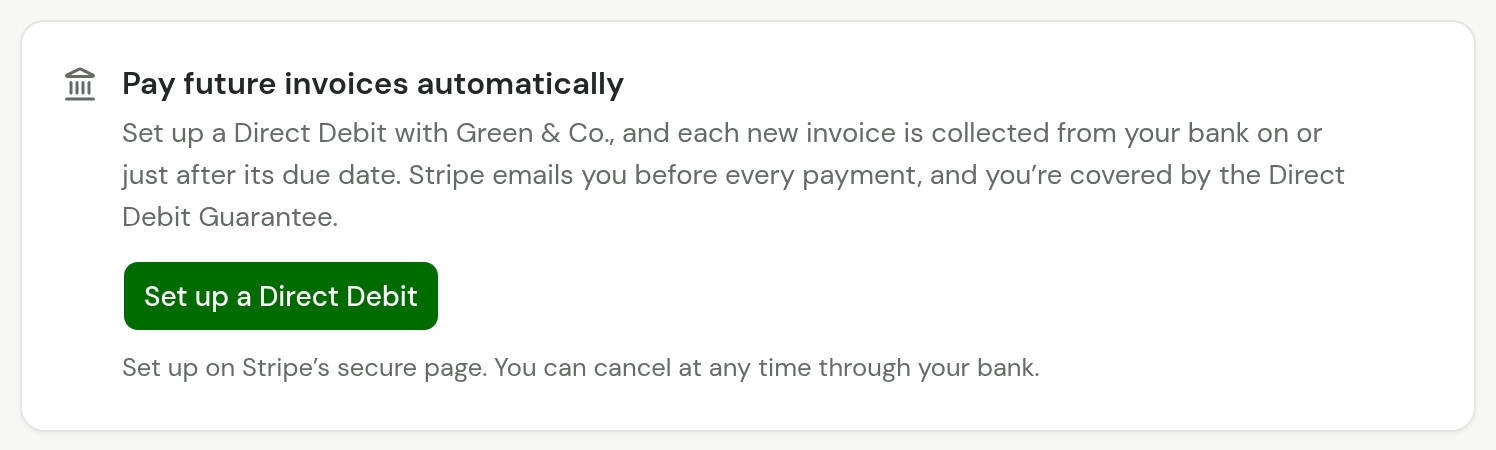
Your customer opens their customer portal. Under what they owe is a card headed Pay future invoices automatically.
-
They choose Set up a Direct Debit. Stripe's page opens, where they give their bank details and agree the Direct Debit.
-
Stripe sends them back to their portal, which reads "Checking your Direct Debit…" and then Direct Debit being set up, with the last four digits of their account. It thanks them and says their bank confirms a new Direct Debit in about 3 working days.
-
Until their bank confirms it, nothing is collected and they pay their invoices as usual. When it has, the portal reads Direct Debit set up, and invoices you send from then on are collected.
Their bank details go to Stripe. TradeSender keeps the last four digits of the account number and nothing else about the account.
The card is offered only while you can collect: Bacs is on in your Stripe account, the customer has no Direct Debit already, and the workspace can collect by Direct Debit. A customer whose bank has said nothing for more than a week is offered it again, as Set it up again.
What their portal says afterwards
| The portal says | It means |
|---|---|
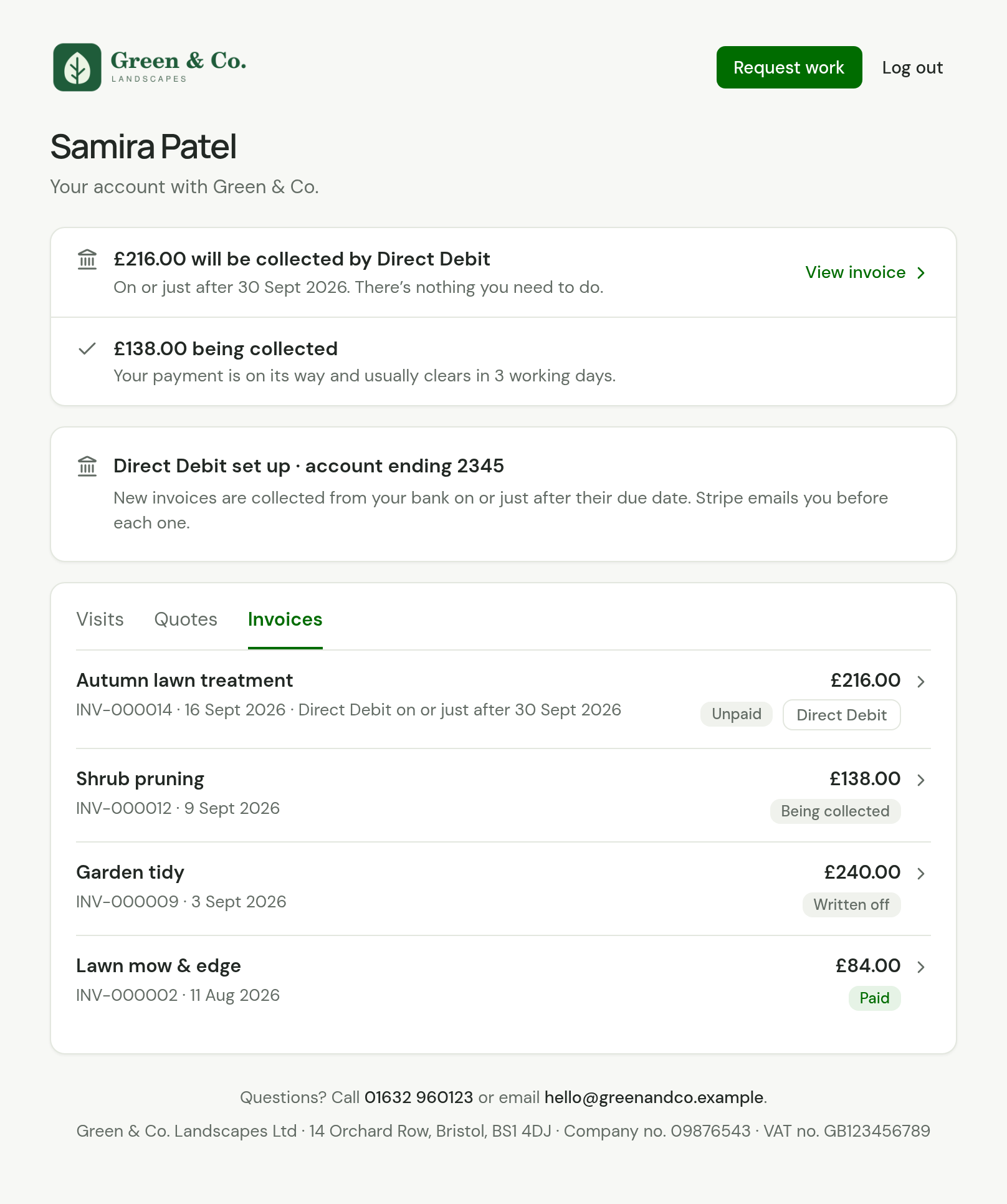
| Direct Debit being set up · account ending 2345 | Their bank has yet to confirm it. "Your bank is confirming it, which takes about 3 working days. New invoices are then collected automatically. Until then, please pay your invoices as usual." |
| The same, after more than a week | "Your bank still hasn’t confirmed it, which usually takes about 3 working days. Please set it up again.", with Set it up again |
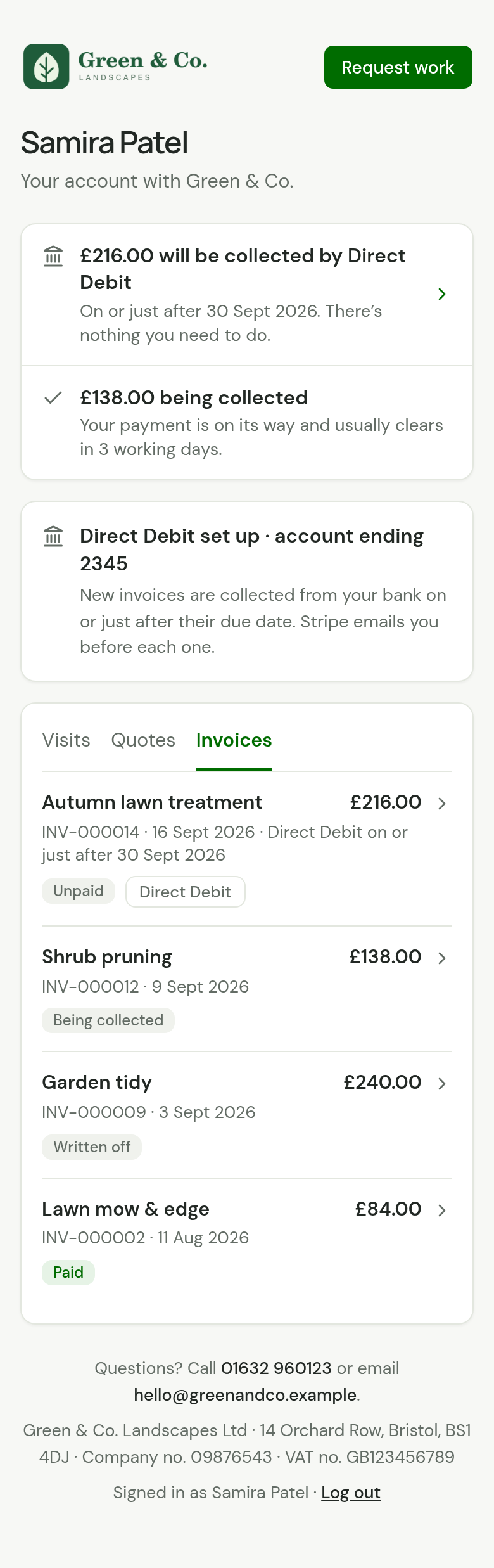
| Direct Debit set up · account ending 2345 | It is in force. "New invoices are collected from your bank on or just after their due date. Stripe emails you before each one." |
| "£216.00 will be collected by Direct Debit" | What is waiting for its day, with the day when it is one invoice |
| "£138.00 being collected" | What has been asked for and is on its way |
| We’re waiting to hear about your Direct Debit | They came back from Stripe's page and TradeSender has not heard yet. It tells them not to set it up again |
| Your Direct Debit was cancelled | It has ended. Set it up again starts a new one |

An invoice waiting to be collected has a Direct Debit label in place of Pay, and its line gives the day.
What you see on the customer
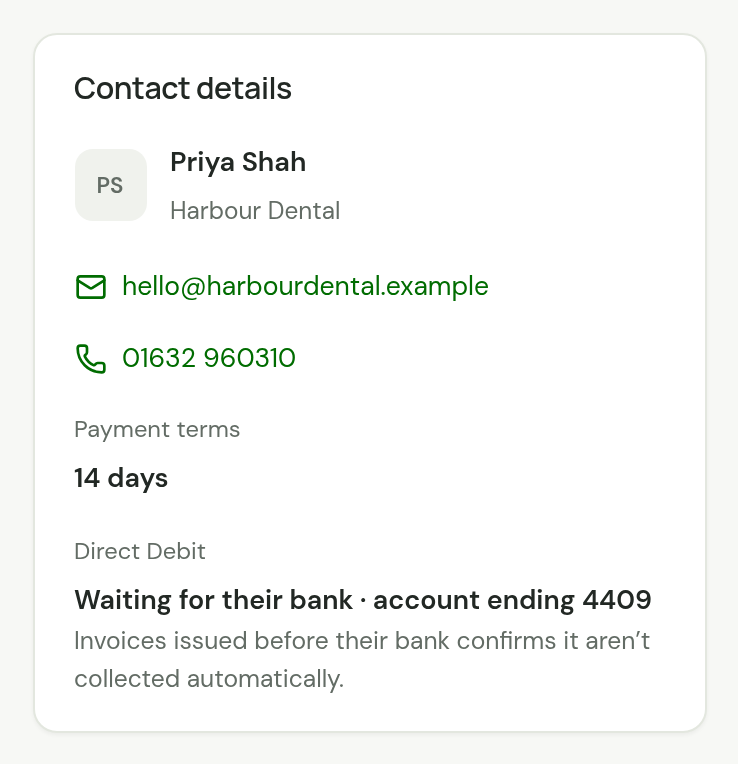
For owners and office members, Contact details on the customer's page has a Direct Debit line.
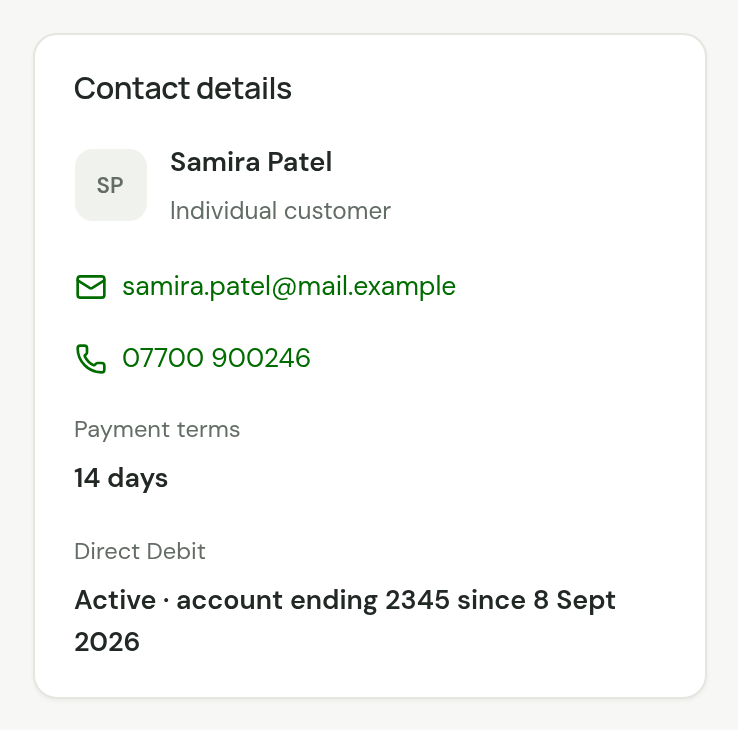
| It reads | It means |
|---|---|
| "Not set up" | They have never set one up. "Customers set this up from their portal. Email them the sign-in link." |
| "Waiting for their bank · account ending 4409" | Agreed, and not yet confirmed. Under it: "Invoices issued before their bank confirms it aren’t collected automatically." |
| "Active · account ending 2345 since 8 Sept 2026" | In force since that day, which is the day their bank confirmed it |
| "Cancelled on 14 Sept 2026" | Refused by their bank, or cancelled |
Technicians are not shown it.
When each invoice is collected
TradeSender collects an invoice by itself only when all of these are true:
- You finalised it after their bank confirmed the Direct Debit. That is the day beside "Active" on the customer's page. An invoice they already owed is not collected, and nor is one you send while their bank is still confirming it: each is an ordinary invoice, to pay as usual.
- Nothing has been taken or tried for it online before. A collection that failed is not tried again by itself, and what you refunded is not taken back.
- It is in pounds, with between 50p and £10,000 left to pay. That is the most Stripe takes in one Bacs payment.
- The Direct Debit is in force, and the customer is not archived.
- Its day is less than a week past.
For each invoice like that:
| What | When |
|---|---|
| The money leaves your customer's bank | On the invoice's Due date. If that is a Saturday or Sunday, the Monday after |
| TradeSender asks Stripe to collect it | Two working days before, early in the morning |
| Stripe emails your customer the amount and the date | When TradeSender asks |
| The invoice reads Paid | About three working days after it is asked for, once the bank has paid |
Three things follow from the two working days' notice:
- The money never leaves before the due date.
- Nothing is collected in the moment you send an invoice. The earliest a collection is asked for is the next morning. If you send an invoice by mistake, void it the same day and nothing is taken.
- An invoice due sooner than two working days away is collected late. It is asked for the next morning and leaves two working days after that. With payment terms of 0 days, expect the money to leave about three working days after you send the invoice.
A bank holiday makes a collection later, never earlier. So everything your customer reads says "on or just after".
What the invoice says while it waits
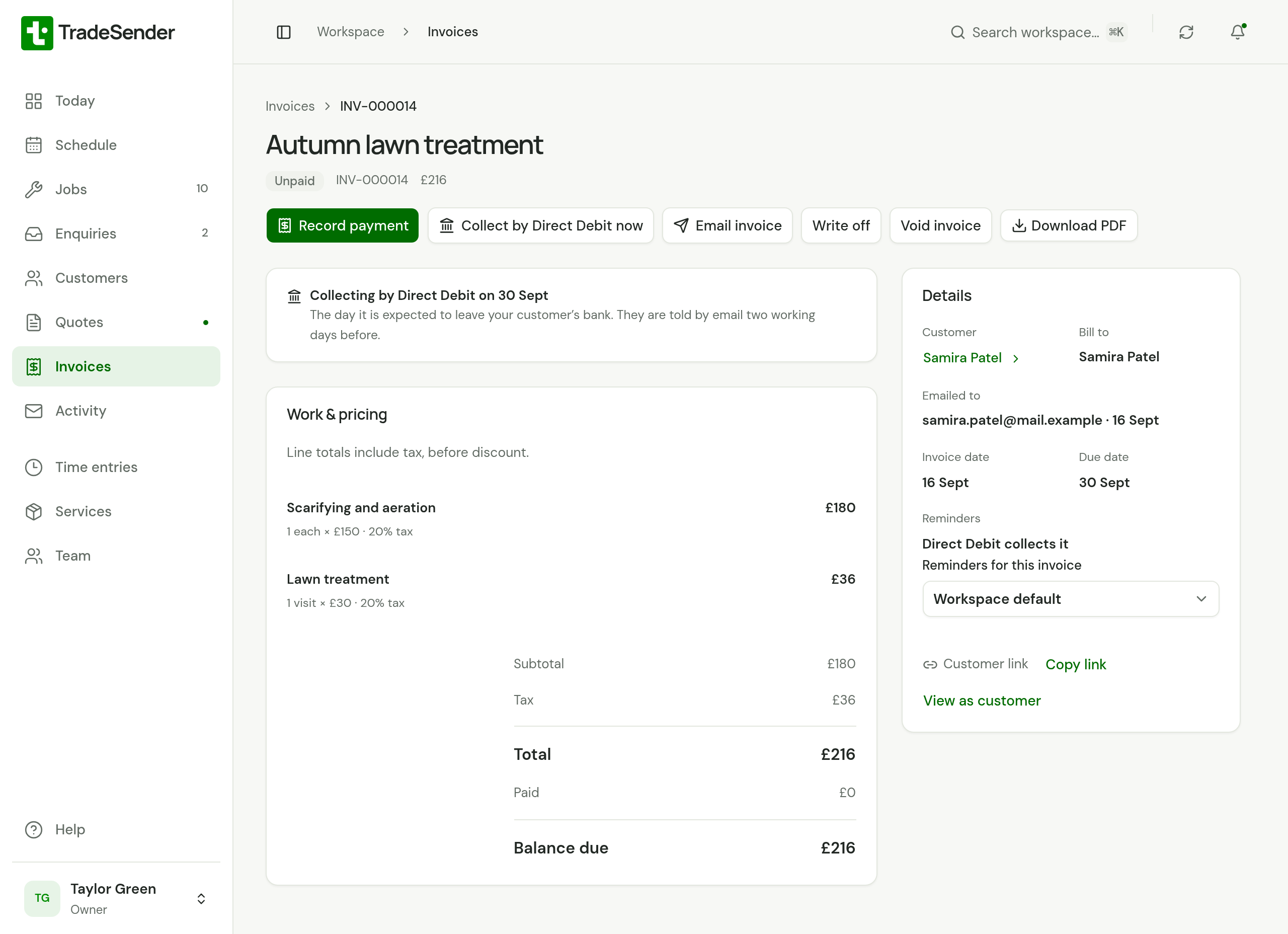
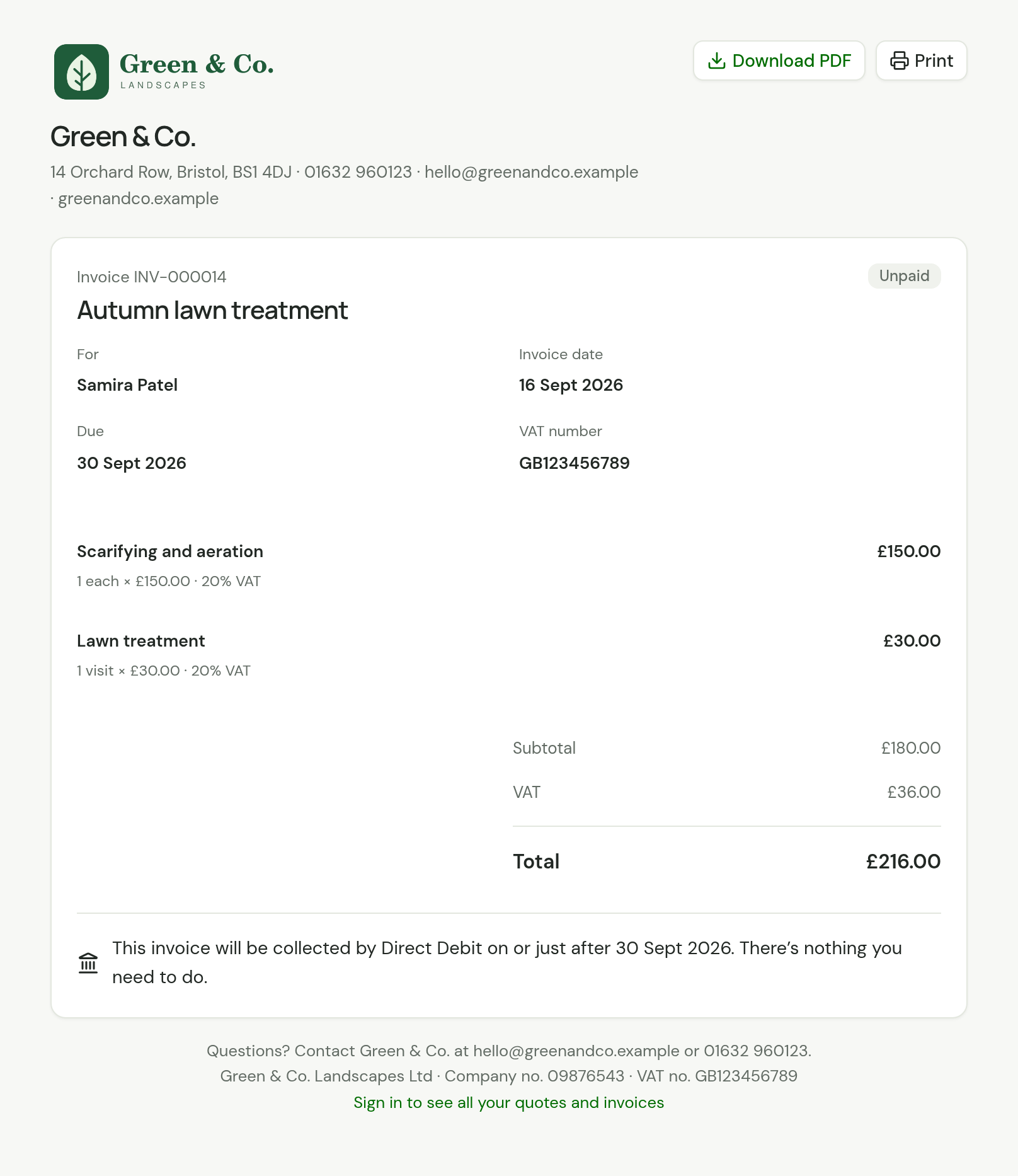
In TradeSender the invoice reads Unpaid, with "Collecting by Direct Debit on 30 Sept". It does not turn Overdue while it waits, and no reminder is sent for it.
If your customer pays it another way before its day, record the payment on the invoice as usual. Once it is paid it is not collected, and one that is part paid is collected for what is left.
Your customer is told the same thing wherever they look, and is asked for nothing:
- The invoice email says "This invoice will be collected by Direct Debit on or just after 30 September. There’s nothing you need to do."
- The invoice's page and its PDF say the same. They show no Pay button and no bank details.
- Their portal counts it under "will be collected by Direct Debit", apart from what is left to pay.
Collect one now
Collect by Direct Debit now asks for an invoice's money today. Use it for an invoice that will not collect itself, such as one the customer already owed when they set their Direct Debit up or one you sent while their bank was confirming it, or to collect one sooner than its day.
-
Open the invoice and choose Collect by Direct Debit now.
-
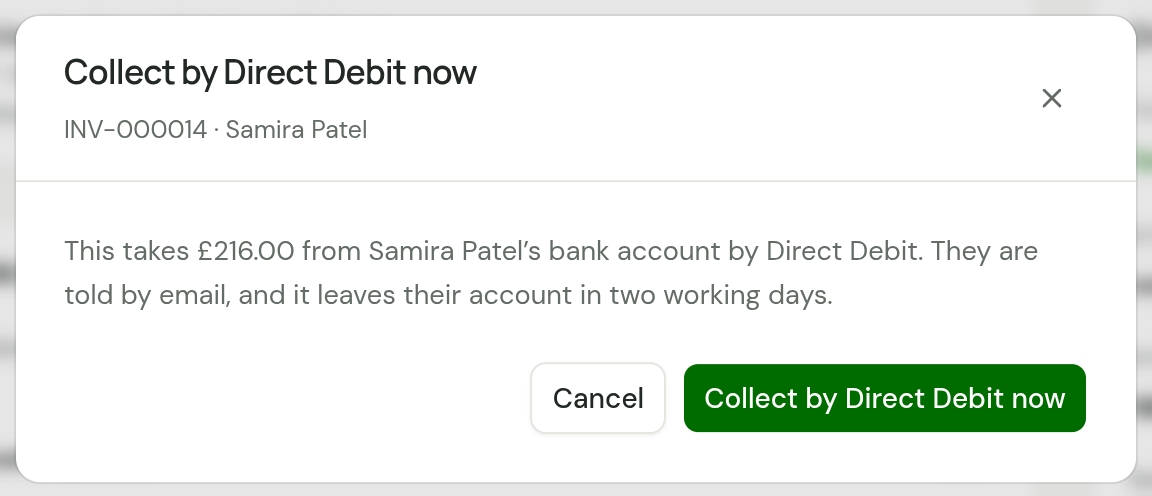
Read what it will do: "This takes £216.00 from Samira Patel’s bank account by Direct Debit. They are told by email, and it leaves their account in two working days."
-
Choose Collect by Direct Debit now again.
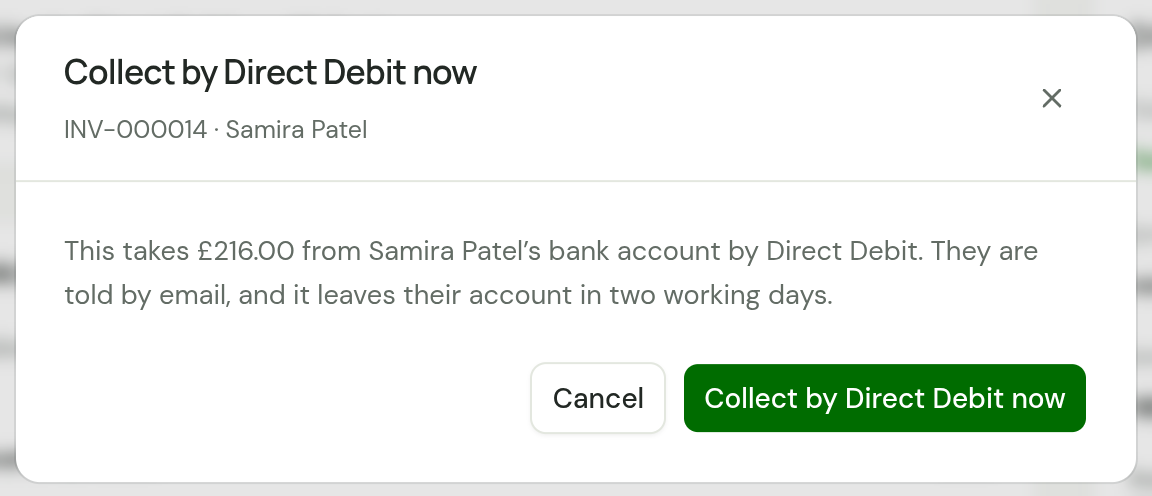
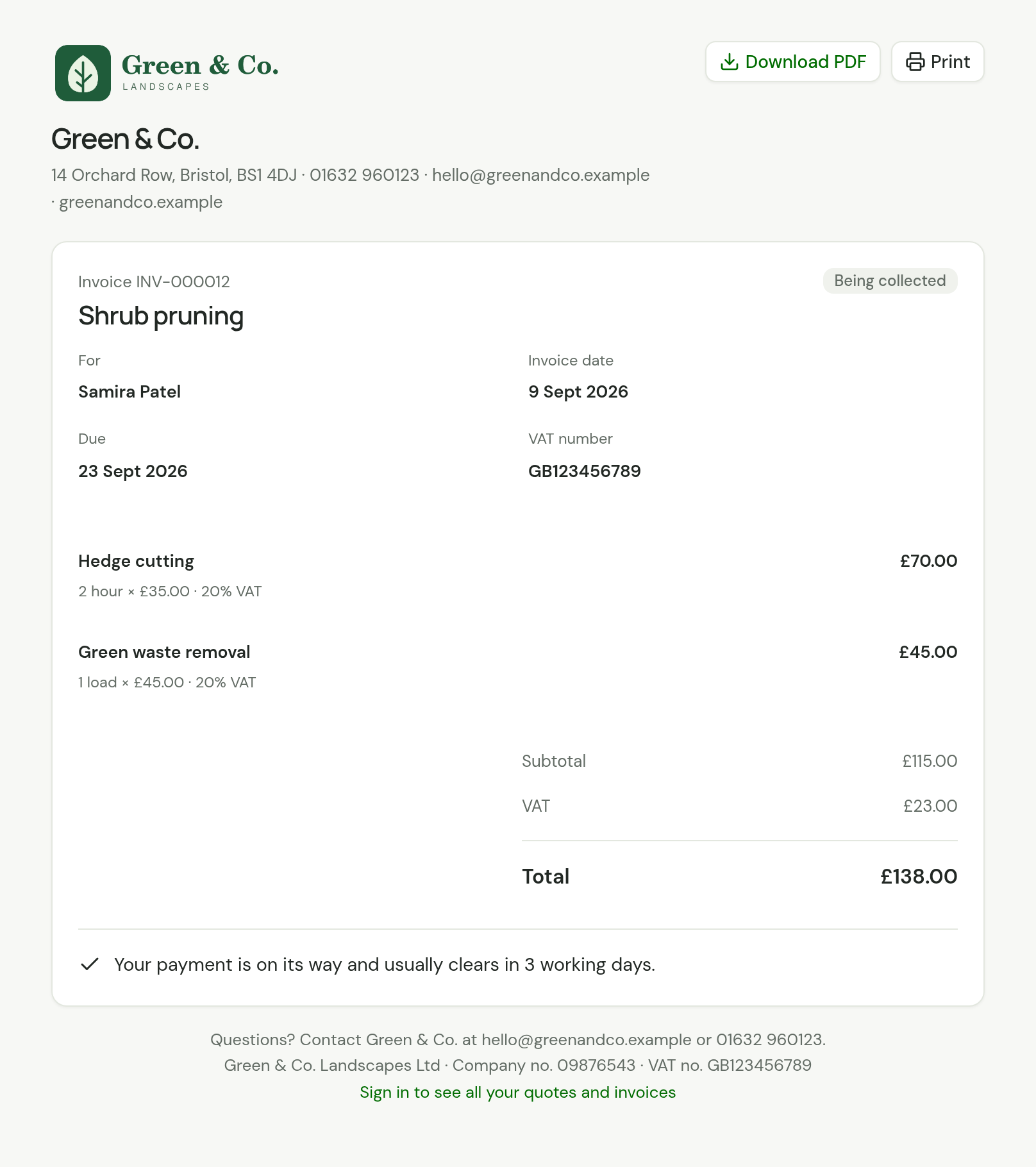
The message says "Direct Debit started." and the invoice reads Being collected.
The button is there for owners and office members, on any finalised invoice in pounds with between 50p and £10,000 left to pay, whose customer has a Direct Debit in force, while nothing for it is already on its way. It always takes everything still owed on the invoice.
While it is being collected
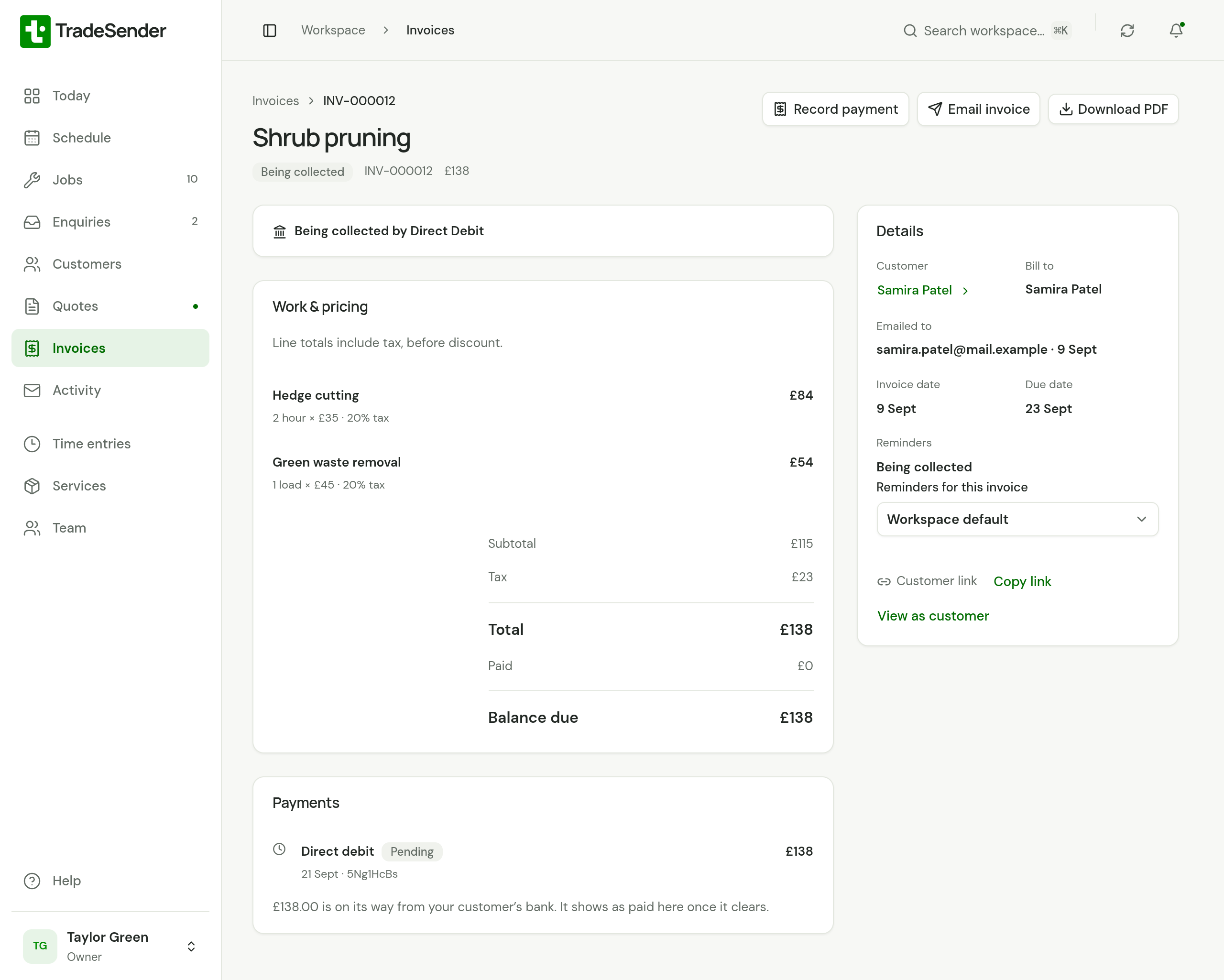
The invoice has a Direct debit payment marked Pending under Payments, with "£138.00 is on its way from your customer’s bank. It shows as paid here once it clears."
Until the bank pays or refuses, the invoice:
- cannot be voided.
- is not Overdue, and is not chased.
- shows your customer no Pay button and no bank details. Their page reads "Your payment is on its way and usually clears in 3 working days."
Record payment is still there on the invoice. Do not use it for money that is already being collected, or the invoice is paid twice and you have a refund to make. Record payment on the customer, which spreads one payment across their invoices, leaves this one out: see Invoices that are already being collected.
When a collection fails
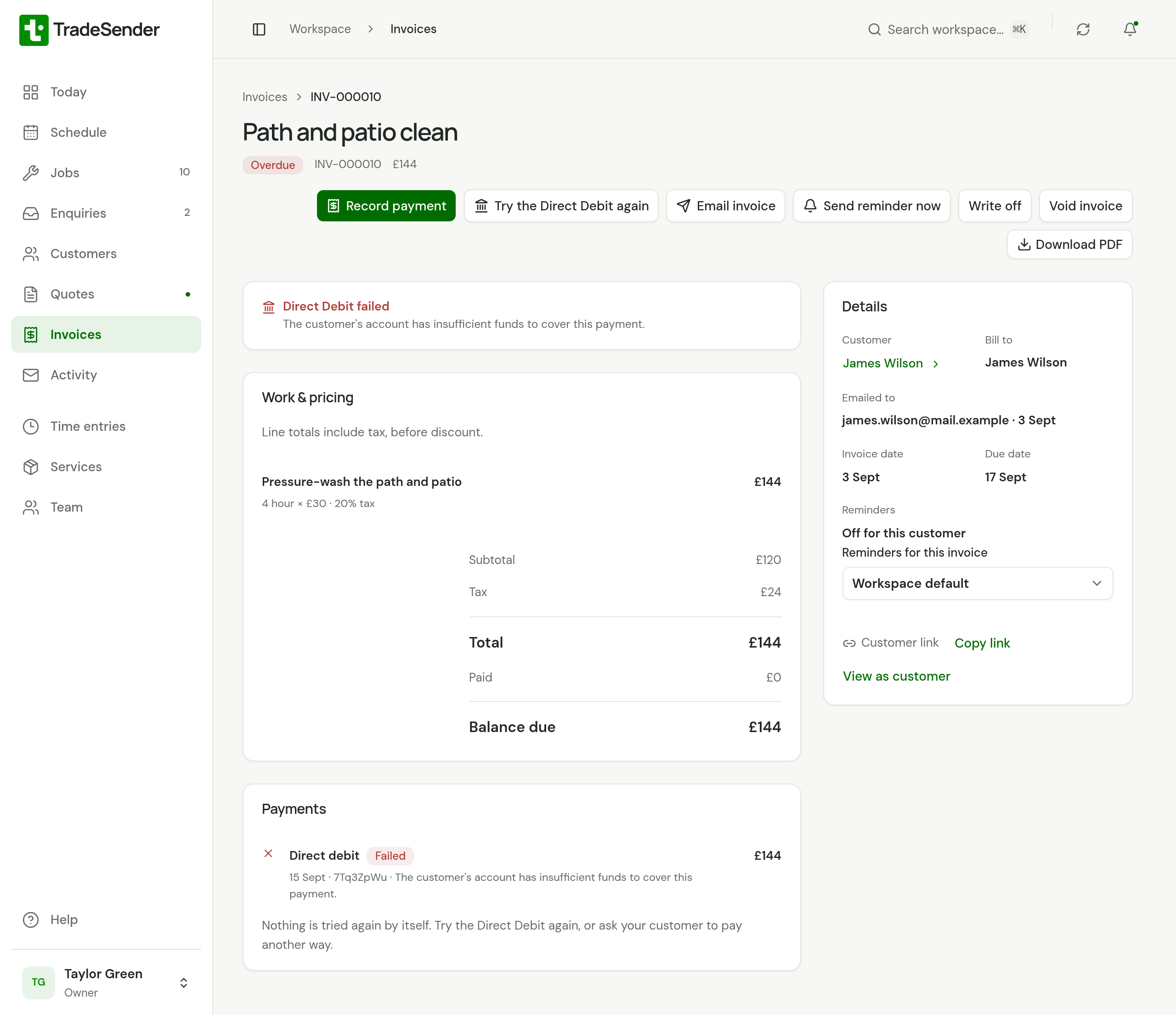
A bank can refuse a Direct Debit, most often because there is not enough money in the account. Stripe can also refuse to start one, when the bank account or the Direct Debit is no longer there or the amount is over a limit. Either way the collection has failed, and TradeSender treats the two alike.
| Who | What happens |
|---|---|
| The invoice | A Direct debit payment reads Failed, with the reason Stripe gave. The invoice is unpaid again, and reads Overdue if its due date has passed. A panel on its page reads Direct Debit failed |
| Your customer | TradeSender emails them, with the subject "We couldn’t collect invoice INV-000010 by Direct Debit". It says "We couldn’t collect £144.00 for invoice INV-000010 by Direct Debit, so the invoice is still to pay." and promises nothing about trying again. It has their link to the invoice, whose page offers the other ways to pay |
| You | TradeSender emails your business "Direct Debit failed: James Wilson, invoice INV-000010", with what Stripe said. It goes to your Business email, or to the owners if you have none. When Stripe would not start the collection, it says so, and that nothing was asked of your customer's bank |
| Needs attention | The invoice is listed as Direct Debit failed, in place of Payment overdue, until you try again or it is paid |
| Your phone | Owners and office members with the iPhone or Android app see Direct Debit failed, with the customer and the invoice's number. See Notifications on your iPhone and on Android |
| Sent on the customer | The email to them is listed as Direct Debit failed |
Nothing is tried again by itself. Speak to your customer, then do one of these:
- Choose Try the Direct Debit again on the invoice. It works as Collect by Direct Debit now does.
- Ask them to pay another way. The invoice's page offers Pay online and your bank details again.
Your customer is not emailed about a failure if they have no email address, if their Overdue invoice reminders is set to Off, or if they are archived. Nor are they emailed when you chose Collect by Direct Debit now on an invoice they were not expecting to be collected and Stripe would not start it: nothing reached their bank.
Each press of Try the Direct Debit again that fails adds another Failed payment to the invoice and another email to your business.
If the invoice's reminders are on, an invoice whose collection failed is left alone for the First reminder days and then chased like any overdue invoice: see Automatic emails.
When a bank takes a payment back
A bank can return a Direct Debit after it was paid, and a customer can claim one back under the Direct Debit Guarantee. Stripe treats that as a dispute you cannot contest. The payment reads Failed with the note "Dispute lost", the invoice is unpaid again, and TradeSender emails your business. It does not email your customer: that conversation is yours to have.
When a customer cancels
A customer cancels a Direct Debit at their bank. A bank can also refuse a new one.
- The customer's page reads "Cancelled on" and the day.
- TradeSender emails your business "Direct Debit cancelled:" and their name.
- Needs attention lists Direct Debit cancelled for 14 days.
- Nothing more is collected from them. Invoices that were waiting become ordinary unpaid invoices, with Pay online and your bank details.
- Their portal reads Your Direct Debit was cancelled and offers Set it up again.
TradeSender does not email the customer about it. A collection already on its way when they cancel is not called back.
You cannot cancel a customer's Direct Debit from TradeSender. The customer cancels it at their bank, or you end it in your Stripe dashboard. An archived customer is never debited, whatever their Direct Debit says.
If your workspace goes down to Free
Your customers keep the Direct Debits they set up, and nothing is collected on them.
| Where | What it says |
|---|---|
| Settings, Getting paid | Direct Debit: Off, "Automatic Direct Debit collection isn’t included on the Free plan." |
| The customer's page | "Not collected on your plan." under their Direct Debit line |
| The customer's portal | "Green & Co. isn’t collecting by Direct Debit at the moment, so please pay your invoices as usual." |
| Their invoices | Ordinary unpaid invoices again: Pay online, your bank details, and Overdue once the due date passes |
Collect by Direct Debit now goes too. Collections already on their way are not called back.
When you subscribe again, collecting starts again. An invoice whose day passed more than a week ago is not collected by itself: use Collect by Direct Debit now.
The same happens if you switch Bacs Direct Debit off in Stripe. The customer's page then says "Not collected: Bacs Direct Debit is switched off in your Stripe account."
In the iPhone and Android apps
The apps show the same lines on a customer and an invoice, and lists Direct Debit failed and Direct Debit cancelled under what needs attention. An owner or office member can choose Collect by Direct Debit now on an invoice, and is asked "Collect by Direct Debit?" first.
Collecting needs a connection. It is never saved on the phone to send later, so money is not taken at some later moment when the phone finds signal.
Owners and office members with either app are told when a collection fails (Direct Debit failed) and when a customer's Direct Debit ends (Direct Debit cancelled). A collection that succeeds sends nothing to the phone: the invoice reads Paid. See Notifications on your iPhone and on Android.
What it cannot do
- Collect what was already owed when the Direct Debit was set up, or what you sent while their bank was confirming it, by itself. Use Collect by Direct Debit now on each of those invoices.
- Try a failed collection again by itself.
- Collect on a day of the month you choose. The day follows each invoice's due date.
- Collect part of an invoice, or more than £10,000 in one payment.
- Collect in a currency other than pounds, or from a bank account outside the UK.
- Set a Direct Debit up for a customer, or cancel one.
- Tell your customer when their Direct Debit ends.
Good to know
- A deposit invoice is collected like any other, for a customer whose Direct Debit is in force. It is due the day the quote is accepted, so it is asked for the next morning and leaves two working days after that. The quote's page tells them so in place of a button to pay: "Thanks. Your deposit of £240.00 will be collected by Direct Debit on or just after 16 Nov 2026. There’s nothing you need to do."
- If you have the same person as two customers, each can set up a Direct Debit of their own.
- Stripe's notices go to the email address your customer gave Stripe. Changing their email address in TradeSender does not change it there.
- Your customer's bank statement shows the payments as Stripe, or as your business if you have arranged that with Stripe.
- Stripe charges its own fees for a Direct Debit, and for one that fails or is returned. TradeSender adds nothing.
- Your AI assistant can use Collect by Direct Debit now for an owner or office member. It is told to say which invoice, whose it is and how much, and wait for a yes. See What an assistant can and cannot do.
Checked against the app on 29 October 2026. Still stuck? Ask usAsk us.