Finished jobs
What makes a job finished, what you can still change afterwards, and how it goes on to an invoice or is left uninvoiced.
Owners and office members look after finished jobs, on the web and in the iPhone and Android apps. This page follows the web.
When a job is finished
A finished job reads Completed. It gets there in one of two ways.
- The crew finishes its last visit. On a one-off job, finishing the last visit with Job done finishes the job too. The last day of a job booked over several days counts as its last visit. See Work a visit.
- You choose Complete job. The button is on the job's page once no visit is left to finish or cancel. Use it for a round you are ending, for a job where the crew chose Coming back and never returned, and for a job that never had a visit.
Complete job on a repeating job stops every repeat on it and removes the visits still to come. A job cannot be completed while someone is clocked in to it.
Until then, the job's page tells you what is in the way, such as "1 visit still to complete or cancel."
What the status says next
| Status | Meaning |
|---|---|
| Completed | The work is done. No invoice has gone out for it. |
| Invoiced | Its invoice has been emailed or marked as sent. A draft does not count. |
| Paid | That invoice is paid in full. |
A completed job billed after each visit reads Invoiced once every finished visit is on a sent invoice, and Paid once those are paid.
What you can still change
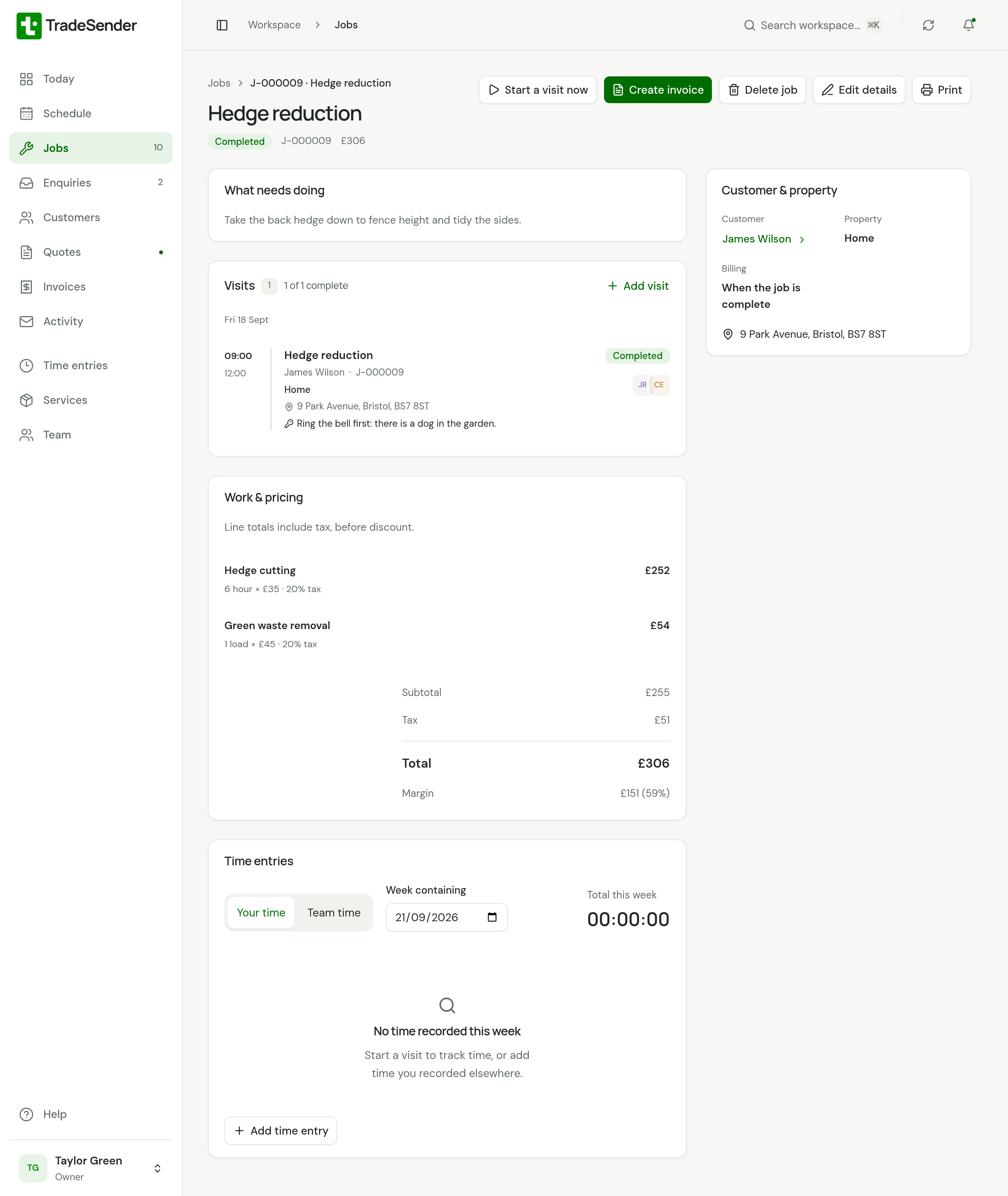
A completed job stays editable. Choose Edit details to change its title, the description, the pricing, Bill or the internal notes. You do not reopen it first.
A job made from a quote has a Quote panel beside its visits, which reads "From quote" and the quote's number. Choose it to open the quote.
| You want to | What happens |
|---|---|
| Price a job that was finished with no price | Add the lines under Pricing. See Invoice a job. |
| Change the price after it is invoiced | The job changes. The invoice does not: it stays as it was sent. |
| Change the customer or property | You can, until the job has an invoice. After that they are fixed. |
| Change a finished visit | You cannot edit or cancel a visit that is finished. You can still add photos to it. |
| Do more work on it | Choose Add visit or Start a visit now. The job becomes Active again. |
Reopen a cancelled job
A cancelled job is the one kind you reopen. On its page, choose Reopen job and confirm. It becomes active again, so you can book visits on it. Its old visits stay as they were, cancelled ones included.
Send it on to an invoice
A completed job billed When the job is complete shows one of these on its page:
| Button | When |
|---|---|
| Create invoice | The job has a price and no invoice yet. |
| Add pricing to invoice | The job has no price. It opens the job's pricing, and saving creates the invoice. |
| Open invoice | The job already has an invoice. |
A job billed After each visit shows Invoice 2 completed visits, with the number still to bill, for as long as any are waiting. See Bill per visit. A job billed At month end shows the same button for the visits of months that are over: see Invoice at month end.
To find every job that is waiting, open Jobs and choose To invoice, or look for Ready to invoice under Needs attention on Today. A finished visit's card on Today has Create invoice on it too: see A finished visit on Today.
Jobs you do not invoice
Some work never needs an invoice from TradeSender: it was paid in cash on the day, done free of charge or billed somewhere else. Left alone, a job like that sits under Ready to invoice for good.
Choose Edit details and set Bill to Don’t invoice. You can do this before the job is finished or after.
- The job leaves Needs attention and the To invoice list.
- It keeps its place in Jobs and still reads Completed.
- Its page says "Not invoiced. To invoice it, edit the job and change Bill."
To invoice it after all, change Bill back. Once one of a job's visits has been invoiced, Bill can only move between After each visit and At month end.
Delete a finished job
Delete job is on a completed or cancelled job. It takes the job out of your lists. Invoices already raised from it are kept.
Checked against the app on 29 October 2026. Still stuck? Ask usAsk us.