Invoice at month end
Bill a round once a month. Finished visits wait until the month is over, then one run raises and emails every invoice.
Owners and office members invoice at month end, on the web and in the iPhone and Android apps. This page follows the web.
A lawn round is cut every week or fortnight and paid for once a month. Set its job to At month end and TradeSender stops asking for an invoice after each visit. On the 1st, every such job with finished visits from the month before waits in one row, and one run invoices them all.
Bill a job at month end
A job is billed this way when its Bill is At month end.
- On a new job, ticking Repeats sets Bill to After each visit. Change it to At month end yourself.
- On a job you already have, choose Edit details and set Bill.

The job's line items are the price of one visit, as they are for a job billed after each visit. For a weekly cut at £35, the job has one line for £35.
A job with an invoiced visit can still move between After each visit and At month end. It cannot move to When the job is complete or Don’t invoice, and the editor says so: "A visit has been invoiced, so Bill can only move between these two."
What waits, and until when
A visit is due for its invoice when all of these are true:
- Its job is billed At month end.
- The visit is finished.
- It is not on an invoice. A draft invoice counts as an invoice.
- It was booked for a day before the 1st of this month.
On the 31st, nothing from this month is due. On the 1st, all of last month is. The month turns by your Workspace time zone, so it turns at the same moment for everyone on the team.
A visit belongs to the month it was booked for, whichever day the crew finished it. A visit booked for the 31st and finished on the 1st is last month's.

| Through the month | Once the month is over |
|---|---|
| The job's page reads "Visits this month are invoiced at month end." and offers no invoice for them | The job's page shows Invoice 4 completed visits, with the number that are due |
| The job is not under Needs attention and not under To invoice in the Jobs list | Needs attention on Today has one Month end row for all of these jobs, such as "3 jobs to invoice · £420" |
| A finished visit's card on Today offers no invoice | Ready to invoice under Work in hand counts the jobs and what their invoices would come to |
Run it
-
Open Invoices and choose Invoice month end. The Month end row under Needs attention opens the same dialog.
-
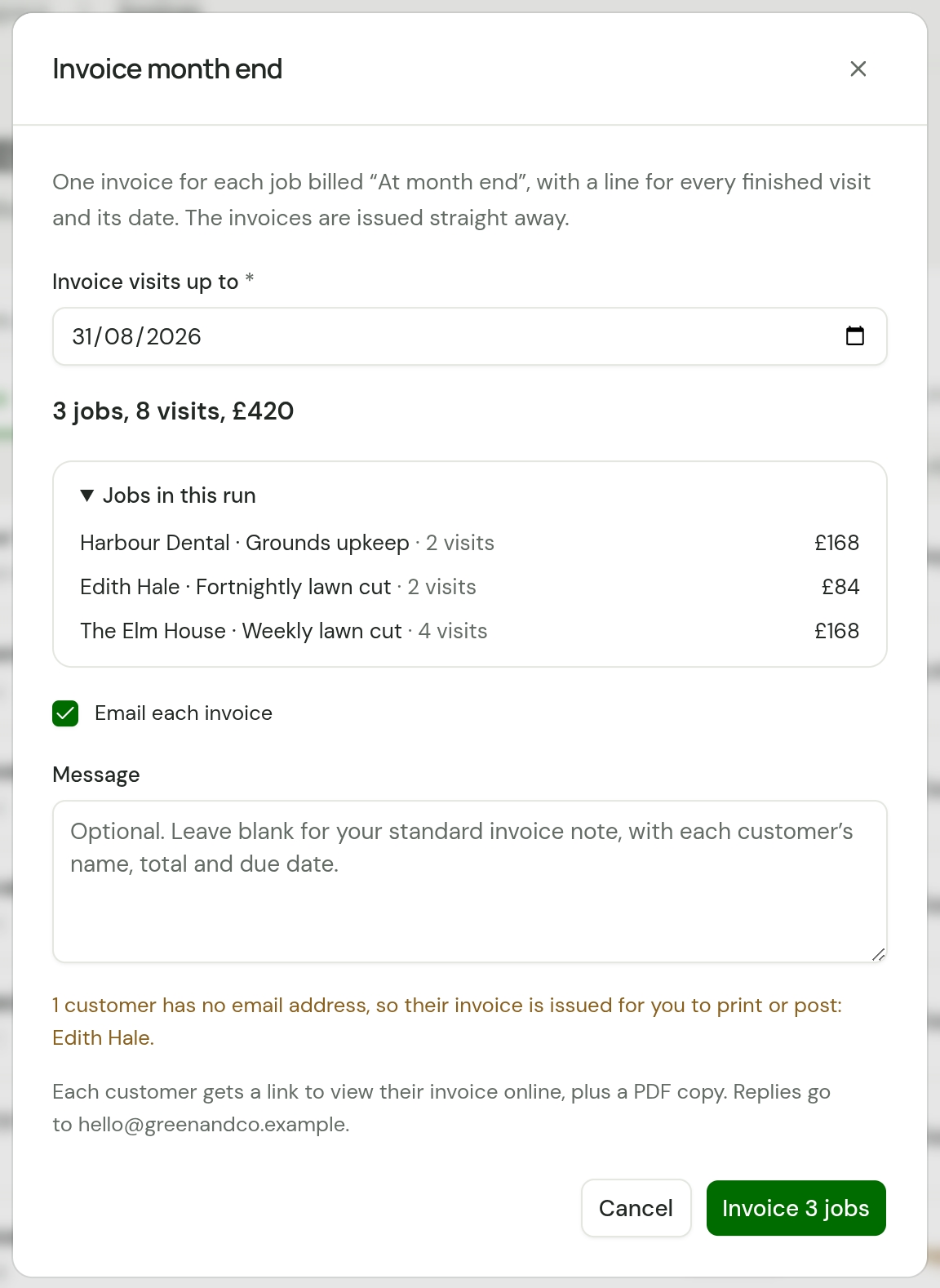
Check Invoice visits up to. It starts at the last day of last month. The line under it says what the run will invoice, such as "3 jobs, 8 visits, £420".
-
Open Jobs in this run to see each job with its customer, its visits and what its invoice comes to.
-
Leave Email each invoice ticked to send each invoice to its customer. Untick it to raise the invoices and email nobody.
-
Type a Message if you want one for this run. Leave it blank and each customer gets your standard invoice note, filled in with their own name, total and due date.
-
Choose the button, which counts the jobs: Invoice 3 jobs.
The dialog then says what it did, and lists any invoice it could not email. Choose Done.
| It says | When |
|---|---|
| "3 invoices issued and emailed" | Every invoice went to its customer |
| "3 invoices issued, 2 emailed" | One customer has no email address |
| "3 invoices issued, none emailed" | Email each invoice was ticked and no customer has an email address |
| "3 invoices issued" | You unticked Email each invoice |
What a run does
- One invoice for each job. An invoice never covers two jobs. A customer with a mowing round and a hedge round gets two invoices and two emails.
- A line for each visit. Each line carries the visit's date, as on any invoice for a job billed by the visit. See What the invoice looks like.
- No drafts. Each invoice is finalised as it is raised: it reads Unpaid and cannot be edited. If one is wrong, void it and its visits go back to waiting.
- Dated the day you run it. The Invoice date is today, and the Due date follows each customer's payment terms.
- All or nothing. If the run cannot invoice one of the jobs, it invoices none of them and tells you why.
Each email is listed under Sent on its customer's page. It goes from your own mailbox if you have connected one.
Customers with no email address
A customer with no Email address still gets an invoice. It is raised and finalised with the rest, and nobody is emailed about it.
- Before you run, the dialog names them: "1 customer has no email address, so their invoice is issued for you to print or post: Edith Hale."
- Afterwards it lists each one with a link to the invoice, under "issued but not emailed". Open each, choose Download PDF, and print or post it.
Jobs with no pricing
A job that has visits to invoice and no line items is left out, and the dialog names it: "1 job with no pricing is left out. Add pricing to invoice it". Choose the job in that message. Add pricing to invoice on its page prices the job and raises its invoice in one go.
Invoice before the month is over
Sometimes a round ends in the middle of a month. Two ways to invoice early:
- The whole round. Set Invoice visits up to to a later day, such as today. The run then takes every job billed at month end with a finished visit up to that day.
- One job. Choose Edit details on the job and set Bill to After each visit. Its page then shows Invoice 3 completed visits for every finished visit, and you choose which go on the invoice. Set Bill back afterwards if the round carries on.
The limits on a run
A run takes up to 300 jobs. With more than that waiting, TradeSender refuses the run and invoices nothing. The web app cannot run part of a round, so invoice some of the jobs from their own pages first, with Invoice 4 completed visits, until 300 or fewer are left.
A run's emails do not count towards the 100 emails a day you send by hand. You can run month end on a day when that limit is used up, and send other invoices afterwards.
A large run takes a while. Leave the dialog open until it answers.
In the iPhone and Android apps
Invoice month end is at the top of the Invoices tab once a job is billed at month end. It asks for the same date, lists the jobs and has the same Email each invoice switch. It needs a connection: the app says "Month end needs a connection. It isn’t saved on this phone to send later."
Good to know
- TradeSender does not start the run by itself. Nothing is invoiced until you choose the button.
- Run it a second time and there is nothing left: the dialog reads "No job billed at month end has finished visits up to" and the date.
- A job first visited on the 31st waits a month for its invoice, unless you invoice it early.
- A cancelled job is left out of a run.
- When a customer pays the month in one transfer across several invoices, record it once: see One payment across several invoices.
Checked against the app on 29 October 2026. Still stuck? Ask usAsk us.