When something can't go across
Where TradeSender lists what Xero refused, what each message means, how Try everything again works, and what to do when connecting fails.
Sometimes your books refuse something, or TradeSender is waiting on a choice only you can make. Nothing is lost when that happens. The item waits, everything else carries on, and TradeSender tells you where it is stuck.
Where problems show
- Settings, then Connected apps: Xero's card says "1 couldn't go to Xero." (or however many there are). Choose it, and Xero's sheet says so in amber twice: "1 couldn't go" beside your organisation's name, and "1 couldn't go to Xero" above Where things go, with Show and Try everything again. Show lists them, and becomes Hide. Each has its invoice number and customer, such as "INV-000011 · Harbour Dental", and what went wrong and what to do. Choose one to open its invoice. Owners and office members see the list. When there are more than 100, "The oldest 100 are shown."
- On the invoice, its Accounting field reads Couldn't send to Xero. Choose it to open Xero's sheet.
- Today, under Needs attention: "1 couldn't go to Xero", or "Xero needs reconnecting". Choose it to open Xero's sheet.
- By email, each morning at 8 while anything is waiting: "Some things couldn't go to Xero", with up to ten of them and an Open Connected apps button, which opens Xero's sheet. It goes to your Business email, or to the owners if you have none, at most once in 12 hours.
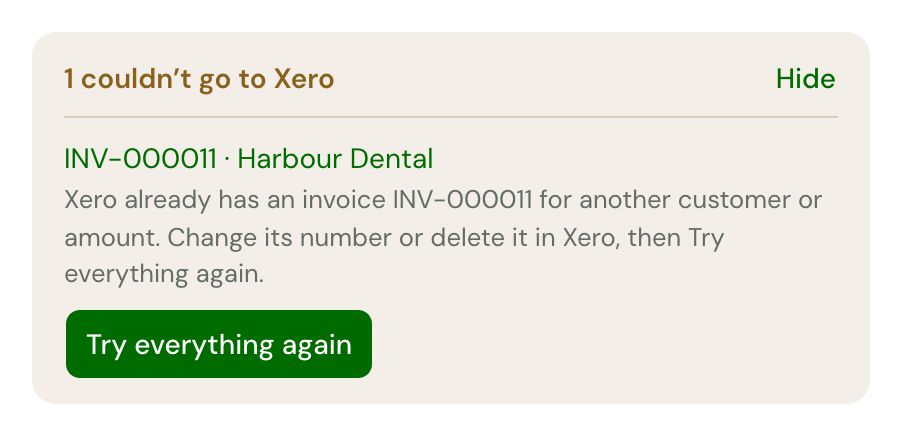
Try everything again
Try everything again sends every problem straight away, with whatever on the same invoice was waiting on it, and checks everything since you connected.
You do not have to press it for most problems. Something your books refused is tried again by itself, waiting a little longer each time: a minute, then 5 and 30 minutes, then 2 and 12 hours, then once a day. Put the cause right and press Try everything again to send it now.
Two kinds wait for you: a payment from your books that TradeSender could not record, and one of your payments that was deleted in your books. Both go again only when you press Try everything again.
What each message means
| You see | What happened | What to do |
|---|---|---|
| "Choose where write-offs go in Settings, Connected apps." | You wrote off a balance before choosing where write-offs go | Choose it in Xero's sheet and Save. It goes by itself |
| "Xero has no 12.5% VAT rate for sales. Add one in Xero, then Try everything again." | Your books have no sales rate at that percentage | Add the rate in Xero, then Try everything again |
| "This invoice is in EUR. Xero only takes invoices in GBP, the currency Green & Co Ltd works in." | The invoice is in another currency | Nothing: it cannot go |
| "Xero already has an invoice INV-000041 for another customer or amount. Change its number or delete it in Xero, then Try everything again." | Someone typed an invoice with that number in Xero | Change or delete Xero's copy, then Try everything again |
| "This payment is reconciled in Xero. Unreconcile it there, then Try everything again." | The payment changed here (a refund, say) and Xero will not change one that is reconciled | Unreconcile it in Xero, then Try everything again |
| "This payment was deleted in Xero on 3 Nov. Try everything again to send it to Xero again." | Someone deleted a payment TradeSender sent. TradeSender still counts it | If it was paid, Try everything again. If it was not, correct it here |
| "A payment of £40.00 in Xero wasn't recorded: it is more than INV-000041 still owes here. Check the payments on both, then Try everything again." | A payment in Xero would overpay the invoice, often because it was recorded in both places | Delete the extra one, here or in Xero |
| "A payment of £40.00 in Xero wasn't recorded: INV-000041 is written off here. Undo the write-off to record it, then Try everything again." | The customer paid after you wrote the balance off | Undo write-off, then Try everything again |
| "A payment of £40.00 in Xero wasn't recorded: INV-000041 is not open here. Check it in TradeSender and in Xero, then Try everything again." | The invoice is void or archived here | Check which is right |
| "Xero refused this: …", with Xero's own words | Xero said no for another reason | Read Xero's words. It is tried again by itself |
| "Xero couldn't be reached. TradeSender will keep trying by itself." | Xero was down or slow. It shows only after three tries | Nothing |
| "Something went wrong sending this to Xero. TradeSender will keep trying, and has been told." | A fault at our end | Nothing: we have been told |
Xero needs reconnecting
When your books stop accepting TradeSender, Xero's card in Settings, Connected apps says "Xero no longer accepts TradeSender's access to Green & Co Ltd. Nothing waiting is lost.", and so does Xero's sheet, under your organisation's name, which reads Needs reconnecting in amber, with a Reconnect Xero button. TradeSender emails your Business email, or the owners if you have none, at once, with the subject "Reconnect Xero to keep your books up to date", and Today shows "Xero needs reconnecting".
Nothing goes across until an owner chooses Reconnect Xero and picks the same organisation. Then everything that waited goes. Until then there is no Try everything again, and Edit is greyed out. Office members see "Ask the workspace owner to reconnect." See Reconnect.
When connecting fails
Back in Settings, Connected apps after Xero's page, Xero's sheet may say one of these:
| You see | What to do |
|---|---|
| "Nothing was connected. You cancelled in Xero." | Connect again when you are ready |
| "That took too long. Please connect again." | You were on Xero's page for more than 10 minutes. Start again |
| "Only the workspace owner can connect accounting." | Ask an owner |
| "Your plan doesn't include accounting sync." | Accounting sync is on Pro and Business. See Plans |
| "Xero is already connected. Disconnect first to connect a different organisation." | Your workspace has a connection already |
| "Another TradeSender workspace is connected to that organisation. Disconnect it there first." | An organisation connects to one workspace |
| "That's a different organisation. Reconnect Green & Co Ltd, or disconnect first to connect another." | You chose another organisation while reconnecting |
| "Choose one organisation in Xero, then connect again." | You chose more than one on Xero's page |
| "TradeSender can't connect any more Xero organisations just now. Please try again later." | We have reached the number of organisations Xero lets us connect. Email support@tradesender.co.uk |
| "Something went wrong connecting Xero. Please try again." | Try again. If it keeps happening, email support@tradesender.co.uk |
Checked against the app on 10 November 2026. Still stuck? Ask usAsk us.